
Metro Pro – Genesis Magazine WordPress Theme (GPL Licensed)
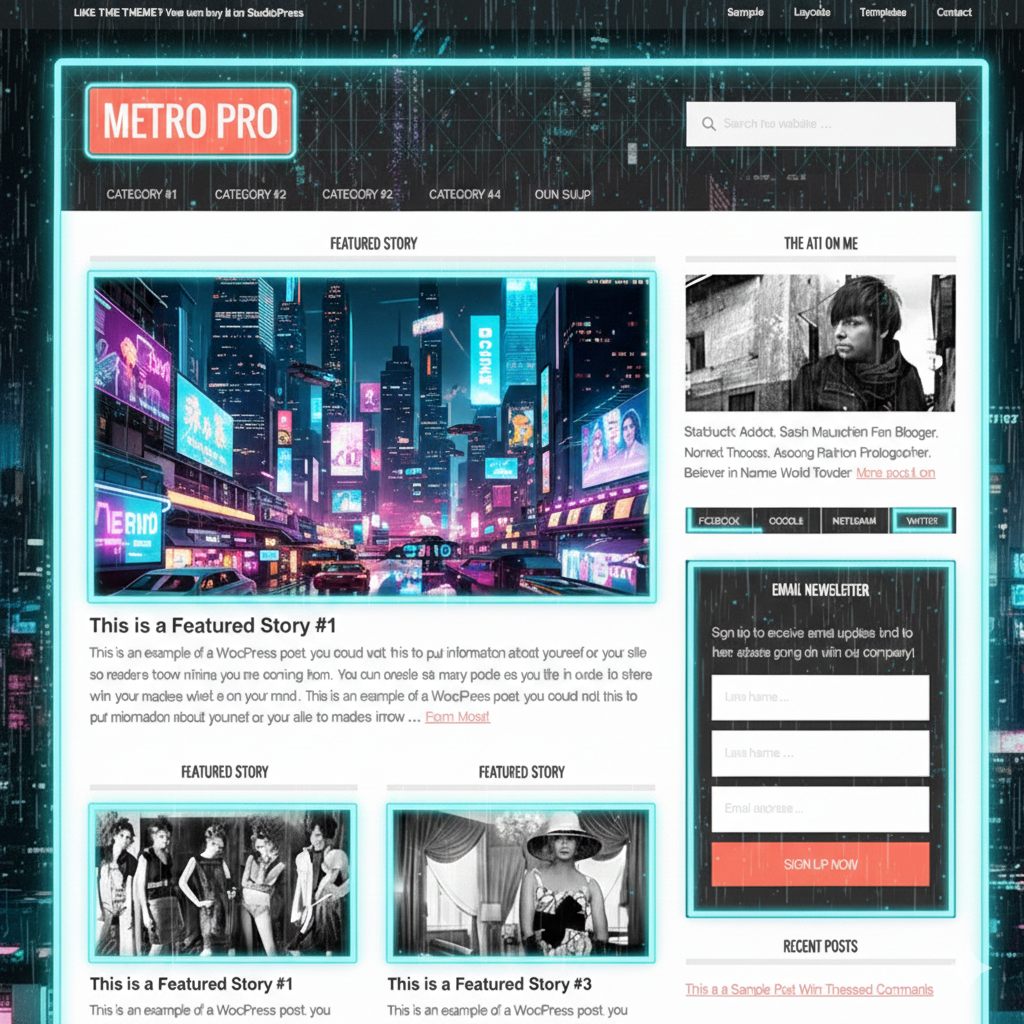
Metro Pro is a bold and modern magazine-style WordPress theme developed by StudioPress and built on the powerful Genesis Framework. Designed for news websites, online magazines, and content-rich blogs, They features a clean grid layout, large featured images, and strong typography to highlight your content.
Available as a GPL-licensed download from wpshop.net, it includes lifetime free updates and limited email support.
⭐ Key Features
-
Professional magazine-style homepage layout
-
Large featured images for high visual impact
-
Powered by the fast and secure Genesis Framework
-
Fully responsive and mobile-friendly design
-
Multiple built-in color schemes
-
Widgetized homepage for drag-and-drop customization
-
SEO-optimized structure via Genesis
-
Translation ready for multilingual websites
-
GPL licensed for unlimited website usage
-
Lifetime updates via wpshop.net
📘 Theme Overview
Metro Pro is ideal for publishers and bloggers who want a clean yet visually powerful website. Its grid-based layout, bold typography, and image-focused design help keep readers engaged and improve content visibility.
Built on the Genesis Framework, They ensures fast performance, strong security, and excellent SEO foundations. Whether you run a news portal, editorial blog, or online magazine, this theme provides a professional and scalable solution.
📊 Metro Pro vs Standard Magazine Themes
| Feature | Metro Pro | Typical Magazine Themes |
|---|---|---|
| Genesis Framework | ✅ Included | ❌ Not available |
| SEO Optimization | ✅ Genesis-powered | ⚠️ Basic |
| Magazine Layout | ✅ Built-in grid system | ❌ Extra setup needed |
| Color Schemes | ✅ Multiple options | ⚠️ Limited |
| License | ✅ GPL – Unlimited sites | ❌ Restricted |
🛠 Installation Guide
-
Download Metro Pro Genesis Theme (GPL) from wpshop.net.
-
Log in to your WordPress Dashboard.
-
Go to Appearance → Themes → Add New → Upload Theme.
-
Upload the Metro Pro ZIP file and click Install Now.
-
Install and activate the Genesis Framework (required).
-
Customize colors and layout from Appearance → Customize.
-
Configure homepage widgets to build your magazine layout.
Free Download Now:
📜 Licensing & Updates
-
Licensed under GPL (General Public License)
-
Unlimited installations for personal and client websites
-
Lifetime free theme updates
-
Original Metro Pro theme files (no modifications)
-
Limited email support from wpshop.net
❓ Frequently Asked Questions
Is the Genesis Framework required?
Yes. It is a Genesis child theme and requires Genesis to work.
Is Metro Pro suitable for news and magazine sites?
Yes, it is specifically designed for content-heavy and editorial websites.
Is the theme mobile-friendly?
Yes, It is fully responsive on all screen sizes.
Can I change the color scheme?
Yes, multiple color options are included.
Can I use it on multiple websites?
Yes, the GPL license allows unlimited usage.
🌟 Why Choose Metro Pro?
Metro Pro combines high-impact design, Genesis-powered performance, and editorial-focused layouts to help your content stand out. If you want a professional magazine theme with strong SEO, fast loading, and GPL freedom, It is a smart and reliable choice.